
Microsoft Dynamics 365 Field Service
Microsoft Dynamics 365 Field Service helps businesses deliver efficient on-site service through smart scheduling, real-time insights, mobile-enabled technicians and predictive maintenance to improve customer satisfaction, reduce costs, and boost productivity.
What is MS Dynamics 365 Field Service?
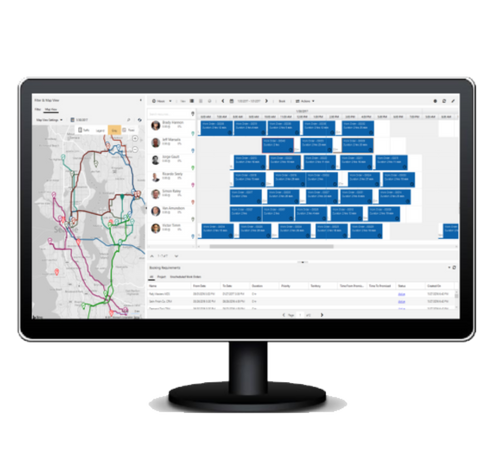
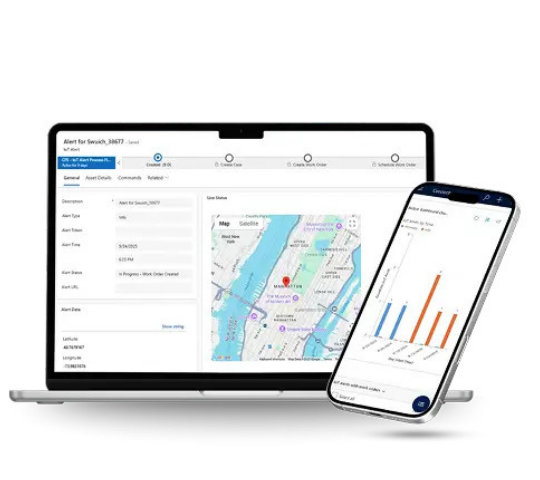
Microsoft Dynamics 365 Field Service is a complete solution designed to help businesses deliver smooth and reliable on-site services. Whether a company repairs equipment, installs products or provides routine maintenance, this system makes the entire process easier. It helps teams schedule appointments, track work orders, manage customer details, and guide technicians with the right information before they arrive at the job site. Technicians can use a mobile app to see their tasks, check inventory, record notes, and update job status in real time. Managers get a clear view of what’s happening in the field, allowing them to make better decisions and solve problems quickly. The platform also supports preventive and predictive maintenance, which helps companies fix issues before they turn into bigger problems.
Benefits of Microsoft Dynamics 365 Field Service

Higher First-Time Fix Rates
Technicians get the right tools, information and parts before they arrive to help them solve issues on the first visit.

Smarter Scheduling and Dispatching
The system automatically assigns the best technician for each job based on skills, location, and their availability to save time and reduce travel costs.

Better Customer Experience
Customers receive accurate appointment times, status updates and clear service reports, leading to stronger trust and satisfaction.

Increased Technician Productivity
Field workers can view work orders, customer history, manuals, and checklists directly from their mobile devices.

Reduced Operational Costs
Efficient routing, improved planning, and fewer repeat visits help cut fuel costs, labor time, and wasted resources.

Predictive and Preventive Maintenance
Connected devices and IoT data help businesses detect problems early and fix equipment before breakdowns happen.

Real-Time Visibility for Managers
Supervisors can track jobs, monitor performance and make faster decisions using dashboards and live updates.

Stronger Collaboration Across Teams
Everyone from office staff to field technicians works with the same updated information, reducing errors and delays.

Easy Integration with Other Systems
It works smoothly with Dynamics 365 apps, Power BI, Power Automate and third-party tools to create an end-to-end service solution.
Core Features of Microsoft Dynamics 365 Field Service
Microsoft Dynamics 365 Field Service comes packed with powerful features designed to streamline your field operations. Here are the key features include:
- Create, assign, and track service requests from start to finish, ensuring every job is handled on time and with the right resources.
- AI-driven tools assign the best technician for each job based on skills, location, workload, and availability.
- Keep track of customer equipment, service history, warranties, and performance to ensure accurate and effective repairs.
- Handle service contracts, warranties, pricing, and billing within the system to ensure accurate and timely invoicing.
- Sends automated appointment reminders, provides technician tracking, and shares digital service reports to keep customers informed at every step.


How Microsoft Dynamics 365 Field Service Works?
Microsoft Dynamics 365 Field Service is a tool that helps companies manage their on-site service work. This includes things like taking care of equipment, making repairs, doing inspections and putting in equipment. The system automatically creates work orders, schedules technicians and gives them the resources they need.
The system also tracks everything in time which helps schedule jobs smarter and cuts down on travel time. Microsoft Dynamics 365 Field Service also helps companies take care of equipment before it breaks, so they can fix problems before they get big.
Companies that want to start using Microsoft Dynamics 365 Field Service or make it work better for them can get help from Codexoxo. This expert help can make companies more productive, make their customers happier and make their field operations run smoothly. By using Microsoft Dynamics 365 Field Service, businesses can get a lot of benefits like being able to manage their on-site service work easily.
Why Choose Codexoxo?
Choosing Codexoxo means partnering with a team that truly understands your business and your goals. We combine deep expertise with innovative technology to deliver solutions that are tailored to your unique needs. Our approach is simple: focus on quality, maintain transparent communication, and prioritize your satisfaction at every step. With Codexoxo, you’re not just getting a service provider – you’re gaining a reliable partner dedicated to helping your business grow efficiently and successfully.
Optimize Your Field Service Operations
Empower technicians with intelligent scheduling, work order management, remote assistance, and real-time field service insights.
