
Microsoft Dynamics 365 Sales
Stay organized, strengthen customer relationships, and close deals faster with a sales platform designed to keep your team focused on what matters most. Turn every lead into an opportunity with clear insights and automated workflows.

What is Microsoft Dynamics 365 Sales?
Microsoft Dynamics 365 sales is a software tool that helps businesses manage and improve their sales process. It helps to keep all your customers information, conversation and sales activities so that sales teams can work more smoothly and close deals faster.
- Organize customer details so that you always know who you’re talking to and what they need.
- Tracks sales activities like calls, emails, meetings, and follow-ups.
- Helps spot potential customers and guides you through each step until the deal is won.
- Shows useful insights like which leads are most likely to buy so salespeople can focus on the right opportunities.
- Makes teamwork easier because everyone can see updated information at the same time.
Benefits of MS Dynamics 365 Sales
Microsoft Dynamics 365 Sales helps businesses manage their sales process more effectively and build stronger customer relationships.
- Centralize Customer Information: Keep all customer data, interactions and history in one place.
- Better Lead and Opportunity Management: It helps to track leads and sales opportunities efficiently to prioritize deals.
- Real-Time Insights: Access analytics and reports to understand performance and identify trends.
- Task Automation: Automate repetitive tasks like follow-ups, reminders, and record updates.
- Improved Customer Engagement: Get a 360-degree view of customers for personalized communication.
- Increased Productivity: Spend more time on closing deals instead of administrative work.
- Enhanced Collaboration: Teams can collaborate easily with shared information and tools.
- Revenue Growth: Streamlined sales processes help increase conversions and overall sales.
Key Features of MS Dynamics 365 Sales

Track Every lead and Opportunity
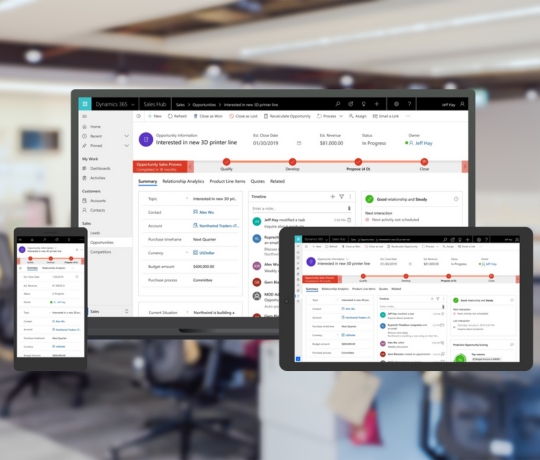
MS Dynamics 365 sales keep all your customers and leads data in one place. You can easily see who needs to follow up with, what stage a deal is in and what actions are pending. This reduces confusion and makes sure no sales slips through the cracks.

Improve Teamwork and Communication
Your team can share notes, updates, emails and documents directly inside the system. Everyone stays on the same page, which means faster responses to customers and less back-and-forth.

Saves time with automation
Routine tasks like sending follow-up emails, creating reminders, or updating records can be automated. This frees up more time for salespeople to focus on actual selling instead of manual work.

Works smoothly with Microsoft tools
It’s part of the Microsoft ecosystem or connects easily with Outlook, Teams, Excel, and other apps. This makes it more convenient to manage emails, meetings, and reports without switching between multiple systems.

Build Stronger Customer Relationships
The system shows you the full history of each customer such as past interactions, purchases, preferences, and issues. With this information, you can give more personalized service and build trust with your clients.

Gives You a Clear View of Your Sales Pipeline
You can quickly check how many deals you have, their value, and their progress. This helps you understand how close you are to meeting your sales targets and where you need to focus more effort.
How Microsoft Dynamics 365 Sales Works?
Microsoft Dynamics 365 Sales works like a smart digital assistant that helps your sales team stay organized.
It Guides You Through Each Step of the Sales Process
MS Dynamics 365 Sales shows you where every lead stands: new, contacted, qualified, in negotiation or closed. You can easily see what action you need to take next, whether it’s sending a follow-up email, scheduling a meeting, or sharing a quote.
Works Smoothly with the Microsoft Apps
Because it’s part of the Microsoft ecosystem, it connects naturally with Outlook, Teams, Excel, and other tools. You can manage emails, schedule meetings, and update customer information without jumping between different systems.
Track of all Conversations and Activities
Every email, meeting, note, or message related to a customer is automatically saved. This makes it easy for you and anyone on your team to understand the full history of that customer without digging through inboxes or asking colleagues.
Uses Automation
The system can automatically send reminders, assign tasks, update records, or follow set workflows. This means fewer manual steps and more time for real selling.
Pricing & Licensing Options
Team Member
Price:
$ 8
per user/month
License:
Read-only access to core sales data, Update existing sales records, Approve sales quotes and View sales performance dashboards.
Sales professional
Price:
$ 65
per user/month
License:
Core sales force automation, Integration with Microsoft 365, Reporting and dashboards
And Manage customer relationships.
Sales Enterprise
Price:
$ 105
per user/month
License:
All features of Sales Professional, Advanced customization capabilities, Sales forecasting tools and Manage sales territories and hierarchies.
Sales Premium
Price:
$ 150
per user/month
License:
All features of Sales Enterprise, Prebuilt customizable intelligence solutions, Embedded AI for sales insights and Advanced forecasting and analytics.
Why Choose Codexoxo?
Codexoxo stands out for its ability to deliver solutions that truly fit the way your business works. Instead of offering generic services, the team takes time to understand your goals and builds customized systems that make your work easier, faster, and more efficient. With strong technical expertise and a practical approach, Codexoxo helps you avoid common implementation mistakes and ensures everything runs smoothly from start to finish. Clients also value the ongoing support and guidance they receive even after a project is completed, making Codexoxo a reliable long-term partner.
